Arrow Beat Performance
Reviews
Arrow Beat Performance stands out for its straightforward arrow-matching mechanic that rewards precise timing over speed. The real-time progress bar provides clear feedback, helping players identify weak sections. The new character lineup adds visual interest without complicating the core gameplay. While the song selection is limited, the challenge of mastering each pattern keeps the experience fresh for multiple playthroughs.
Description
Stage Setup and Core Challenge
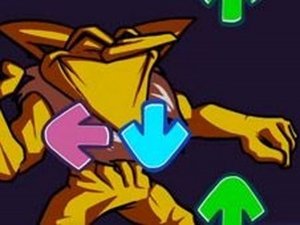
Arrow Beat Performance places players in the role of a performer on a digital stage. The main objective involves watching for arrow symbols that drift across the screen toward a target zone. Pressing the corresponding arrow key on the keyboard at the right moment keeps the music flowing. This setup creates a straightforward yet engaging loop where precision matters more than speed.
Character Roster and Visual Flair
This version introduces a fresh set of characters who accompany the player during the performance. Each character adds visual variety to the stage, though their role remains supportive rather than mechanical. The overall presentation focuses on keeping the player immersed in the musical experience rather than distracting with complex animations.
Progress Tracking and Feedback
A real-time bar on the screen indicates how well the player is performing. Successful hits push the bar in the player's favor, while consecutive misses tilt it against them. This immediate feedback helps players adjust their timing on the fly and understand which sections need more practice.
Pattern Recognition and Practice
Success in Arrow Beat Performance depends on recognizing arrow patterns as they appear. Players who struggle with certain sequences can replay those sections to memorize the order. Staying calm and focusing on the approaching arrows rather than the keyboard improves reaction time over multiple attempts.
Compatibility
Faq
Is Arrow Beat Performance available on mobile devices?
How long does a typical song last in Arrow Beat Performance?
Can I create my own songs or levels in Arrow Beat Performance?
What happens if I miss too many arrows in a row?
Does Arrow Beat Performance include a practice mode for beginners?
Are there different difficulty levels in Arrow Beat Performance?
Games You Might Enjoy

Think Z-Mixed Rhythm Music Game

Rhythm Duel vs Tricky HD
Spider-Man Rhythm Showdown

ASDF Rhythm Beat Match

Speed Rhythm Music Arcade Game

Rhythm Duel: Beat Showdown

FNF Rhythm Arcade Challenge

WonderNope Rhythm Match

GingerBrave Rhythm Showdown

Steve Beat Rhythm Challenge

Beat Match with Luigi