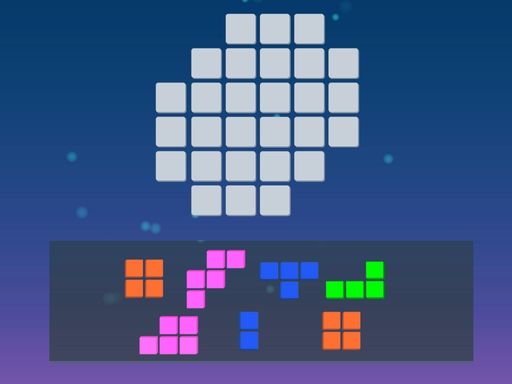
Blocks of Puzzle is a well-designed block puzzle game that offers a relaxing yet challenging experience. The puzzles start easy and become more complex, encouraging logical thinking and spatial skills. The minimalistic graphics are pleasant, and the lack of time limits makes it ideal for unwinding. Replayability is high due to the variety of patterns. It is a solid choice for puzzle fans of all ages.
Blocks of Puzzle is a free block puzzle game that combines the appeal of tangram-style challenges with simple puzzle mechanics. The game presents a grid and a set of minimalistic blocks. Your main goal is to arrange these blocks to fill the board completely, creating satisfying patterns. Designed for both adults and children, it offers a relaxing yet mentally stimulating experience. Each puzzle encourages logical thinking and spatial reasoning, making it a top choice for puzzle enthusiasts. The game is free to download and provides hours of engaging entertainment without any pressure. Whether you are a fan of logic games or just looking for a calm activity, Blocks of Puzzle helps you unwind while keeping your mind sharp.
To play Blocks of Puzzle, start by looking at the grid and the blocks provided. Drag and drop each colorful block onto the grid, aiming to cover every space without leaving gaps. You can rotate blocks to fit them perfectly, which adds a layer of strategy. The game begins with simple puzzles and gradually becomes more complex, testing your spatial awareness and logic. There are no time limits, so you can take your time and enjoy the process. Each completed puzzle gives a sense of accomplishment. The controls are intuitive, making it easy for anyone to start playing right away. Simply tap or click to move blocks, and watch as the board fills up.
Relaxing logic puzzle gameplay. Minimalistic design that is easy on the eyes. Free to play with no hidden costs. Brain training that improves problem-solving skills. Family-friendly content suitable for all ages. No time limits, allowing for stress-free play.
Start with the largest blocks first to see how they fit on the grid. Rotate blocks often to find the best placement. Plan ahead by looking at the remaining empty spaces. Take your time—there is no rush. Practice regularly to improve your spatial reasoning. If you get stuck, try a different approach or take a short break. These strategies will help you solve puzzles more efficiently and enjoy the game even more.