Funky Beat Rhythm Challenge
Reviews
Funky Beat Rhythm Challenge delivers a focused rhythm arcade experience: arrow keys, note timing, and a health bar that punishes misses. The two-mode structure—story for narrative context, free play for practice—gives players a clear way to learn patterns before committing to a full run. Colorful visuals and upbeat music support the timing mechanic rather than distracting from it. Its open-source community origin suggests possible updates, but the core loop is simple and self-contained. Players who prefer accuracy-based challenges over complex controls will get the most from it.
Description
Core Rhythm Mechanics
Funky Beat Rhythm Challenge is a rhythm arcade game built around one central action: pressing the correct arrow key at the exact moment an arrow symbol appears above the character. The game uses keyboard arrow keys, so the challenge is timing and accuracy rather than complex controls. A health bar tracks your performance; missing notes drains it, and too many misses end the run. Completing a song without failing is the win condition. That simple loop defines every session, whether you are playing for the story or just for practice.
Story Mode and Free Play
The game splits its content into two modes. Story mode offers a narrative experience, giving context to the beat-driven challenges. Free play mode strips that away for casual practice, letting you focus on note patterns and timing without story interruptions. Both modes use the same core mechanic, so skills transfer between them. Starting in free play is a practical way to learn how a song's notes are arranged before attempting it in story mode.
Visual and Audio Style
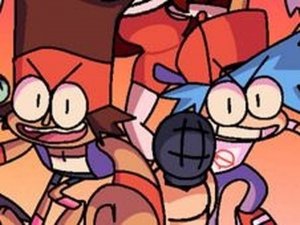
Colorful visuals and upbeat music define the presentation. The energetic theme matches the rhythm gameplay, and the audio is central rather than background decoration—listening to the beat helps you anticipate when notes will appear. The game is inspired by a popular cartoon universe and features a character named BF, which gives the note patterns a recognizable personality. Because it is an open-source project from a creative community, the game may receive updates from contributors, though the core experience remains the same.
Timing, Accuracy, and Practice
Accuracy matters more than speed. Hitting notes correctly keeps the health bar stable; rushing often causes misses that drain it faster. When a note is missed, the best response is to refocus on the next one rather than trying to recover lost ground. Regular practice builds muscle memory for note patterns, which improves performance in story mode. The increasing difficulty of later songs rewards players who develop consistent timing rather than those who simply react quickly.
✅ Compatibility & Testing
Faq
What controls does Funky Beat Rhythm Challenge use?
What happens if I miss notes in Funky Beat Rhythm Challenge?
Is Funky Beat Rhythm Challenge free to play?
What is the difference between story mode and free play in Funky Beat Rhythm Challenge?
Does Funky Beat Rhythm Challenge have multiplayer?
How can I improve my timing in Funky Beat Rhythm Challenge?
Games You Might Enjoy

Kirby Dreamland Rhythm Battle
Funkin Mix

Reality Twist
Funky Beat Rhythm Challenge

Steve Beat Rhythm Challenge

GingerBrave Rhythm Showdown

Cassette Girl Rhythm Challenge

FNF Rhythm Match Online Arcade Game
WonderNope Rhythm Match

NekoFreak Remastered Rhythm Battle

Rhythm Battle Invasion Game

Editorial Notes