Clockwork Castle: A Time-Turner Puzzle
Reviews
Clockwork Castle offers a relaxed puzzle experience built around slowing and stopping time to solve environmental challenges. Its castle setting provides varied visual themes and optional secrets, while the difficulty curve introduces new mechanics gradually. The absence of failure penalties and violent content makes it broadly accessible, though players seeking fast-paced action may find it too slow. The guardian encounter near the end adds a satisfying test of accumulated skills.
Description
Temporal Puzzle Mechanics
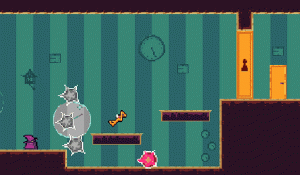
Clockwork Castle centers on a time-manipulation system where you slow or freeze time to interact with moving obstacles and rearrange environmental elements. Slowing time lets you slip past rotating bookshelves or shifting gears, while stopping it entirely gives you a window to reposition objects before resuming. Every action you take during a frozen moment has consequences that play out when time flows again, so each puzzle becomes a lesson in cause and effect. The controls stay simple—point-and-click or tap—so the challenge comes from planning, not from executing complex inputs.
Castle Layout and Exploration
The castle is a network of interconnected rooms and corridors, each with its own visual identity. Grand libraries feature rotating bookshelves, clockwork towers have moving gears, and optional side paths lead to bonus puzzles and hidden artifacts that enhance your temporal abilities. Curiosity is rewarded: poking around corners often reveals collectibles or alternate routes. The whimsical art style keeps the atmosphere inviting, even when the puzzles get tricky.
Difficulty Progression and Guardian Encounter
Early puzzles teach the basics of slowing time, then gradually introduce stopping time and combining both skills in sequence. New mechanics appear at a measured pace, so you build confidence before facing more intricate arrangements. Near the end, a central guardian encounter tests everything you've learned, requiring precise timing and strategic foresight. The curve aims to feel rewarding, not punishing.
Accessibility and Family-Friendly Design
There is no violent content, no time pressure, and no failure penalty. You can rewind or restart puzzles freely, which encourages experimentation and makes the game suitable for young children and adults alike. The design philosophy prioritizes learning through trial and error in a relaxed environment.
Compatibility
Faq
What platforms is Clockwork Castle available on?
Is Clockwork Castle suitable for young children?
How many puzzles are in Clockwork Castle?
Does Clockwork Castle have a multiplayer mode?
What happens if I make a mistake in a puzzle?
Can I play Clockwork Castle with a keyboard and mouse?
Games You Might Enjoy
Inuko Frozen Treat Dash Arcade

Level Four Puzzle Platformer

Enchanted Tower Climb Platformer

Fish Puzzle: Ocean Planner
Ogli Cats 2: Cookie Chase Adventure

Unicorn Dash: Magical Adventure Runner

Duck Key Quest: Puzzle Adventure

Roon and the Beehive Quest: A Platform Adventure

Bunny Egg Hunt Platformer
Squirrel Forest Dash Adventure

Desert Dune Explorer Adventure

Editorial Notes