Cube Stadium Showdown Arcade
Reviews
Cube Stadium Showdown Arcade targets players who want fast, uncomplicated action in colorful cube-themed arenas. Team modes reward cooperation, while single-player challenges offer structured goals for solo sessions. Loadout options add a light strategic layer without overwhelming newcomers. The simple controls and tutorials make it easy to start, though the scoring system gives experienced players something to refine. Online and offline play add flexibility for different settings.
Description
Arena Layouts and Visual Clarity
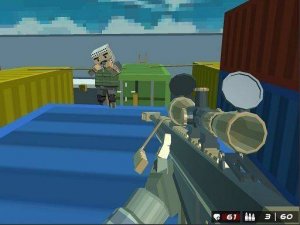
Each battlefield in Cube Stadium Showdown Arcade uses bright colors and simple geometric shapes. The arenas are distinct from one another, and their layouts are built to encourage movement and positioning rather than static play. Because the screen stays visually clear, tracking opponents and objectives is easier, which matters most during fast matches. That clarity supports quick reactions and reduces clutter, so players can focus on where they are going and what they are trying to score.
Match Types and Solo Challenges
Players can pick from several match types that change how points are earned. Team modes reward cooperation, since groups need to outscore their rivals together. For those who prefer playing alone, a set of single-player challenges provides structured goals to complete. These solo stages introduce new obstacles and scoring conditions, giving a different pace from the multiplayer experience. The variety means the game can be approached either as a social competition or as a personal test of consistency.
Loadouts and Strategic Customization
Before entering an arena, players can adjust their equipment through a loadout menu. Options include different color patterns and functional add-ons that affect performance. This system lets each player tailor their setup to match a preferred approach, whether that means focusing on speed, defense, or scoring efficiency. The customization adds a layer of strategy without complicating the core gameplay, so newcomers can ignore it at first and still compete.
Controls, Tutorials, and Accessibility
Newcomers can access tutorials that explain basic controls and common tactics. The control scheme relies on simple on-screen inputs for movement, aiming, and item use. That straightforward setup means younger players or those new to arcade games can start playing with minimal instruction. At the same time, the scoring system and arena layouts provide enough depth for experienced players to refine their strategies over time. The learning curve stays gentle without removing the room to improve.
Online and Offline Play
Online multiplayer connects players for real-time matches where coordination can make a difference. The game encourages communication and teamwork, especially in modes where shared objectives matter more than individual scores. For players who prefer local play, the offline levels offer a complete experience without requiring an internet connection. This flexibility makes the game suitable for different social settings, from competitive online sessions to solo practice at home.
✅ Compatibility & Testing
Faq
Does Cube Stadium Showdown Arcade require an internet connection to play?
What can players customize in Cube Stadium Showdown Arcade?
Is Cube Stadium Showdown Arcade suitable for younger players?
How do team modes differ from solo play in Cube Stadium Showdown Arcade?
What makes the arenas in Cube Stadium Showdown Arcade easy to navigate?
Can experienced players find depth in Cube Stadium Showdown Arcade?
Games You Might Enjoy

Kirby Dreamland Rhythm Battle

Festive Math Logic Puzzle

Baymax Suit Escape Puzzle

Bendy Rhythm Showdown

You Can't Run Encore Rhythm Fun

Beat Battle Rhythm Arcade

WonderNope Rhythm Match

NekoFreak Remastered Rhythm Battle

Butterfly Melody Rhythm Game

Reality Twist

Steve Beat Rhythm Challenge

Editorial Notes