Glow Obstacle Course 3 Arcade
Reviews
Glow Obstacle Course 3 Arcade delivers exactly what its name suggests: a glowing obstacle course with straightforward controls and a gentle difficulty curve. The game's strength lies in its accessibility—mouse or touch input, clear visual cues, and cheerful sounds create a welcoming experience for young children and casual players. Turn-based play adds a social element without pressure. The main limitation is a lack of depth for experienced gamers, but as a family-friendly time-filler, it succeeds at being simple, colorful, and consistently motivating.
Description
Navigating the Glowing Course
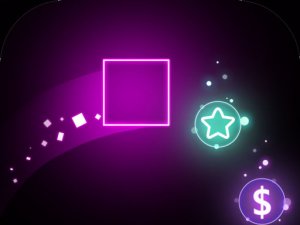
In Glow Obstacle Course 3 Arcade, your goal is straightforward: move a character from start to finish without touching any barriers. The course is set in a glow-in-the-dark environment, where obstacles and paths stand out against a dark background. You control movement using a mouse or touch screen, directing the character left, right, up, or down. Visual cues and gentle sounds signal when to dodge, helping players anticipate what's ahead. The challenge comes from timing your moves correctly as obstacles shift or appear.
Controls and Accessibility
The game uses a simple directional control scheme: tap or click to move. There are no complex button combinations or rules to memorize. This makes it easy for young children to pick up quickly, and the responsive controls mean that mistakes feel like timing errors rather than control failures. Each level introduces new obstacle patterns that are easy to understand at a glance, so players can focus on reaction speed rather than deciphering mechanics.
Progression and Challenge
Levels become progressively more demanding, but the game avoids adding stressful elements like timers or lives. Instead, the difficulty ramps up through obstacle placement and speed, encouraging players to improve their timing and quick reactions. The cheerful sound effects and bright visuals keep the atmosphere friendly, even when a level requires several attempts. There are no complicated rules to learn, so the focus stays on enjoying the colorful course and celebrating small victories.
Playing Solo or with Others
You can play alone or take turns with friends. Turn-based play lets players compare progress and share strategies without direct competition. The game is designed for family play, so sessions can be short and relaxed. Whether you're playing solo or passing the device around, the emphasis remains on having fun and improving your reaction time in a safe, vibrant setting.
Compatibility
Faq
What devices can I play Glow Obstacle Course 3 Arcade on?
Is Glow Obstacle Course 3 Arcade suitable for very young children?
How many levels are in Glow Obstacle Course 3 Arcade?
Can two players compete at the same time?
What happens if I hit an obstacle?
Are there hints or assists for difficult levels?
Games You Might Enjoy
Wanderer Quest Adventure Game

Spider Fly Heroes Endless Flight
Runner's Parkour Quest
Mole Tapper Fun Arcade

SquadZ Quick Strike

Egg Hunt Collection Challenge

Reflex Dodge Action Game
Sweet Slime Factory

Butterfly Melody Rhythm Game
Desert Dune Explorer Adventure

Street Heroes Beat Em Adventure

Editorial Notes