Robocar Poli Coloring Fun
Reviews
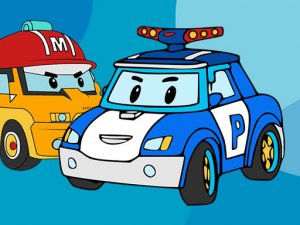
Robocar Poli Coloring Fun does one thing and does it without friction: fill six character pictures using 24 colors, then save or print the result. The absence of penalties and the optional speed-based score let younger children work at their own pace while older players chase faster completion times. The main limitation is scope. Six pictures is a small set, and the fill-by-section format leaves no room for freehand drawing, so children who want open-ended art tools will outgrow it quickly. As a short, quiet activity for families, it fits its purpose.
Description
What You Actually Do
Robocar Poli Coloring Fun turns a familiar offline activity into a click-and-fill exercise. Six pictures featuring characters from the series sit on the main menu, and each one is divided into sections. A 24-color palette runs along the side of the screen. Click or tap any section to flood it with the currently selected color. There is no brush size to adjust, no shading tool, and no undo button to manage. The entire interaction is selection, color choice, and placement, which is why the game works for preschoolers and older children without a tutorial.
Pacing, Scoring, and Freedom
A timer-based score rewards finishing a picture quickly, but the game does not enforce a deadline or penalize mistakes. That combination matters: speed-chasing players can restart for a better time, while younger children can ignore the score entirely and recolor the same section repeatedly. Because every fill is reversible by choosing a new color, experimentation carries no cost. The result is a rare case where a scoring system exists without turning a creative task into a competitive one.
Output and Device Support
Finished artwork can be saved to the device or printed, which extends the activity beyond the screen. Mouse and touch input are both supported, so the same game works on a desktop browser and on a tablet. The interface stays minimal, with no account creation, no complex menus, and no instructions required before the first picture.
Where the Design Fits Best
The six-picture set is small, so the game is better suited to short sessions than long ones. Families looking for a quiet, low-stakes activity will get the most from it. Children who want story missions, character customization, or freehand drawing will find the fill-in-the-section format limiting, because the game is built around coloring existing line art rather than creating new art from scratch.
Compatibility
Faq
How many pictures can I color in Robocar Poli Coloring Fun?
Does Robocar Poli Coloring Fun work on a tablet or phone?
Is there a way to lose or fail in Robocar Poli Coloring Fun?
Can I keep the pictures I color?
What ages is Robocar Poli Coloring Fun designed for?
Do I need to create an account or download anything to play?
Games You Might Enjoy
Warm Room Exit Puzzle

Calm Pattern Link Puzzle

Seasonal Swap Match

Hue Runner: Color Path Challenge

Equilibrium Challenge: Steady Touch Arcade

Nana's Kitchen Puzzle Adventure

Precise Aim 3D: Strategic Puzzle Challenge

Note Harmony Chorus

Space Crew Coloring Fun

Style Creator Doll Studio

Sphere Toss 3D Puzzle

Editorial Notes